Key Features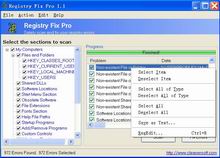
1. Safely scan your Windows registry and fix any problems found.
2.
Increase system speed and stability.
3. Monitor progress of scan.
4.
Repair invalid registry entries that are a common cause of Windows
crashes and Windows file error messages.
5. The automatic creation
of Windows Registry backups, with the option to restore them.
6. Easy-to-use user interface.
Why do you need Free Registry Fix?
Most applications today use
registry to store configuration and other important data. When you
install an application, a new registry entries will be created. These
entries will automatically be deleted when you uninstall the
application. Unfortunately, it does not always work that way. Sometimes,
you will find that some applications fail to remove their own registry
entries. These entries will become obsolete.
After a long period, after installing and uninstalling a lot number of
applications, your Windows registry will contain a large number of
obsolete entries. These will significantly increase the registry size
and thus will slowdown your computer, because Windows will need more
time to load, search, and read data from registry.
Run registry cleaner software like Free Registry Fix to get your computer
working smoothly again. Free Registry Fix will
cleanup your Registry by finding: |